 RTO Vehicle Information
How to Check Vehicle Owner Details by Registration Number plate
You may want to check vehicle owner registration Details for various situations, including ownership details, Insurance validity, PUC status, Hypothecation Status, Road Tax Validity , vehicle theft, road accident, or third-party incidents. You check vehicle registration details when buying second-hand vehicles, and if you lost vehicle-related documents, then Check Vehicle Owner Details
Explore Your Vehicle Services
What Are Vehicle Owner Details?
According to the Regional Transport Office (RTO), vehicle owner details refer to the official records associated with a car, bike, or any other motor vehicle.
These details are useful for verifying ownership, transferring ownership, checking car insurance, and various other purposes. You can easily check vehicle owner details online using the number plate to find out information such as the registered owner, hypothecation status, and more.
How to Check RTO Vehicle Information by official portals
- Visit the https://vahan.parivahan.gov.in/
- You should login to the portal using your mobile number and enter the captcha.
- Click the Next button
- Enter Your Password and click continue button
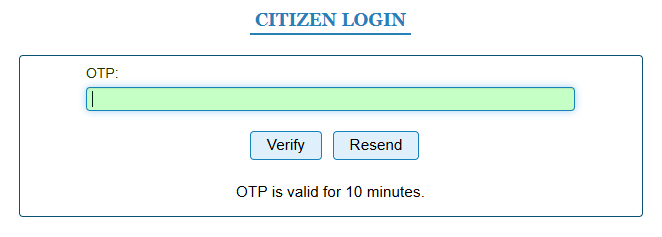
- Enter the 6-digit OTP sent to your mobile number Click Verify button.
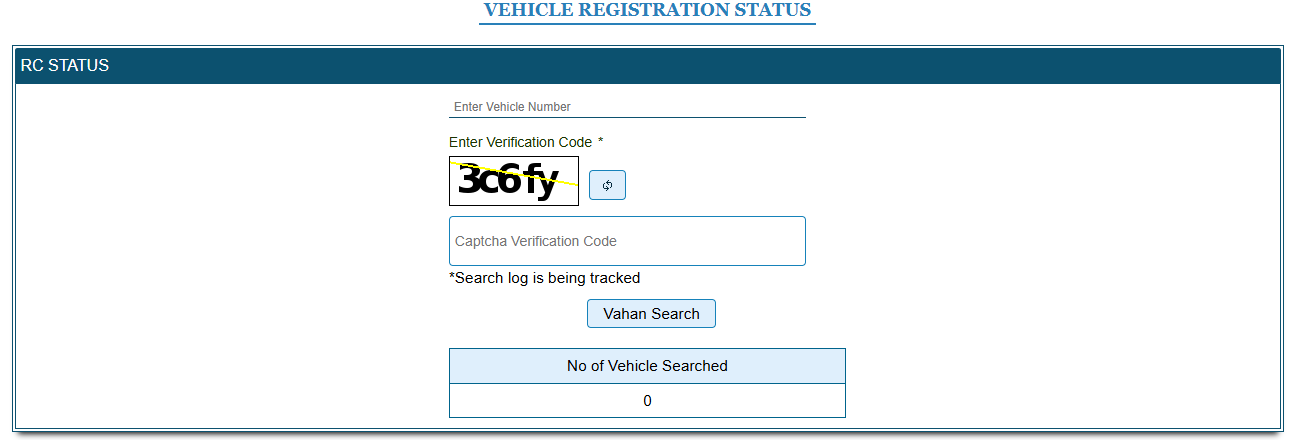
- Now the page open like the below image
- Now enter the Vehicle Registration number and Enter the captcha code
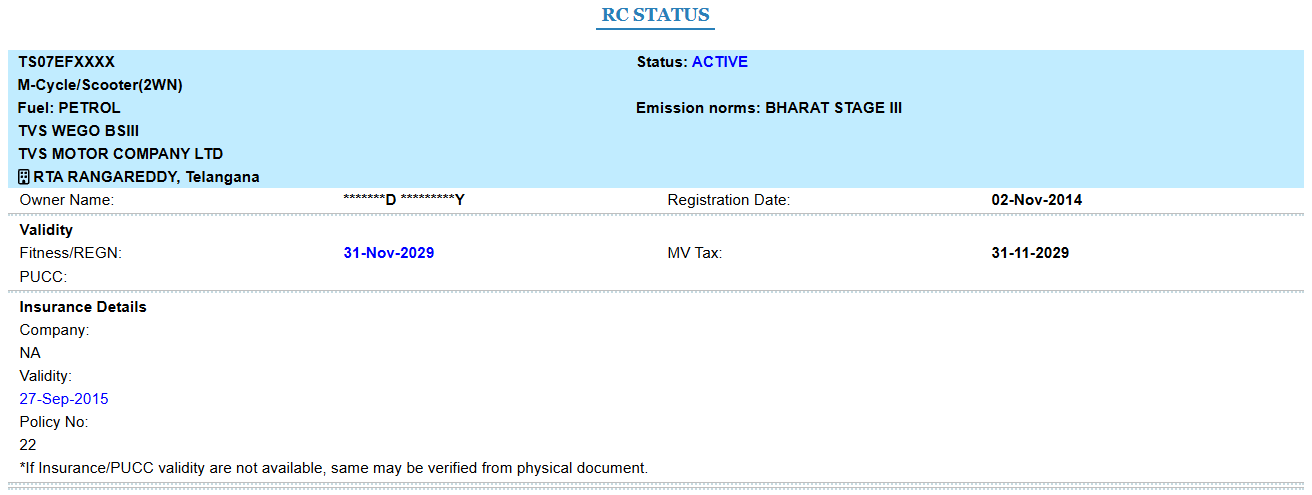
- Click Vahan Search button. The vehicle details will show on the page

Using Mobile Apps
The official mParivahan app can be used to access vehicle-related services provided through the government transport system.
- Download mParivahan app
- Enter vehicle number
- View vehicle details instantly
Method 3 – SMS Method
In some states, those without internet can check some details via SMS services.
VAHAN AP09AB1234 → Send to 7738299899
SMS services may not work in all states and results can vary depending on database availability.
What vehicle owner details are available?
Various vehicle owner details regarding a vehicle owner can be accessed online via Parivahan Sewa or other state portals. Included in the available details, some Vehicle details are fully visible, while other vehicle details are partially masked. Here are the vehicle and owner details available online based on the vehicle registration number:
| Detail | Description | Availability |
|---|---|---|
| Vehicle Registration Number | Unique Vehicle Registration Number assigned by Vehicle through RTO | Unmasked |
| Vehicle Owner Name | Name of the vehicle registered vehicle owner (partially available) | Masked |
| Chassis Number | Unique identification Number assigned by the vehicle Chassis | Masked |
| Engine Number | Unique identification Number assigned by the vehicle Engine | Masked |
| Registration Date | The vehicle Registration Date was officially registered at the RTO Office | Unmasked |
| Vehicle Class | The Vehicle categorization such as LMV, HMV, transport or non-transport | Unmasked |
| Fuel Type | Fuel Type such as Petrol, Diesel, CNG, LPG, Hybrid, or EV | Unmasked |
| Vehicle Make & Model | The vehicle's exact variant /model according to the manufacturer | Unmasked |
| RTO Details | RTO Vehicle registration address | Unmasked |
| RC Validity | Registration Certificate refers to the expiry date | Unmasked |
| Fitness Certificate Validity | The Fitness Certificate refers to the expiry date | Unmasked |
| PUC Validity | PUC Certificate refers to the expiry date | Unmasked |
| Insurance Validity | Insurance Certificate refers to the expiry date | Unmasked |
| Road Tax Validity | Road tax Certificate refers to the expiry date | Unmasked |
| Hypothecation Status | Hypothecation Status refers to whether the vehicle is financed or under a loan agreement | Unmasked |
Why check vehicle owner details?
- Accident: If you are the injured party in a third-party or hit-and-run accident, you may require the other vehicle's details. If you know the vehicle registration number, you can check the vehicle owner's details.
- Police Inspection: Frequently, traffic police can stop your vehicle for routine inspection. If you forgot the vehicle's hard copy for the time of You can show vehicle details via the vehicle registration number on Parivahan Sewa, the mParivahan app, or the state Portal.
- Second-Hand Vehicle: If you purchasing / buying second hand vehicle car/bike then you may check the Vehicle Owner Details via the vehicle number plate. Vehicle Details like vehicle fitness certificate validity, insurance, registration number, PUC, Road tax expiry, etc., you checked via the vehicle number plate.
How to Verify a Used Vehicle Before Buying?
You should keep the ensuing points in mind to verify the vehicle owner registration details before purchasing a used vehicle.
- Check Seller's name with the owner name on the vehicle registration Certificate
- Check the Registration number on the RC card and Number plate
- Check Vehicle insurence Validaty details
- Check Fitness Certificate Validaty
- Check that vehicle ownership transfer documents are completely filled and approved
Is It Legal to Check Vehicle Owner Details?
Yes, checking vehicle registration details through official portals like VAHAN and mParivahan is legal in India. However, personal information is protected under privacy laws and cannot be misused for harassment, fraud, or illegal activities.
Frequently Asked Questions
What details can I check using vehicle number?
You can check RC status, fuel type, registration date, insurance validity, and vehicle class.
Can I find owner mobile number online?
No. Personal details are protected for privacy and security reasons.
Is mParivahan app legal?
Yes, it is an official government application developed under MoRTH.
Can I check bike owner details?
Yes. Both car and bike registration details can be checked.
Is checking vehicle details free?
Most basic services on VAHAN and mParivahan are free.
Can I check pending challans online?
Yes, through official eChallan portals.
Nagaraju
Information Publisher
Disclaimer
RTO Office Details is an informational portal designed to help users easily find RTO office information, vehicle registration details, driving licence status, and insurance-related information.
We are not an official government website. All data and links provided are for informational purposes only.
For any official verification please visit https://parivahan.gov.in/ or contact your respective State Transport Department.