 RTO Vehicle Information
Check RTO Vehicle
Registration Details
Select Location
Explore Your Vehicle Services
Check RTO Vehicle Registration Details
Check RTO vehicle registration details in India with rtovehicleinfohub. rtovehicleinfohub provides RTO Codes, RTO Office Locations, and RTO Contact Details Data for all 36 states and 8 union territories check valid information..
Check Vehicle Registration Details
- Andhra Pradesh
- Andaman and Nicobar Islands
- Arunachal Pradesh
- Assam
- Bihar
- Chandigarh
- Chhattisgarh
- Dadra and Nagar Haveli
- Daman and Diu
- Delhi
- Goa
- Gujarat
- Haryana
- Himachal Pradesh
- Jammu & Kashmir
- Jharkhand
- Karnataka
- Kerala
- Lakshadweep
- Madhya Pradesh
- Maharashtra
- Manipur
- Meghalaya
- Mizoram
- Nagaland
- Odisha (Orissa)
- Puducherry (Pondicherry)
- Punjab
- Rajasthan
- Sikkim
- Tamil Nadu
- Telangana
- Uttar Pradesh
- Tripura
- Uttarakhand
- West Bengal
The Understanding of RTO & Vehicle Registration Information
All motor vehicles plying on public roads in India are assigned a unique vehicle registration or license number. The vehicle registration plate (commonly known as a number plate) is issued by the Regional Transport Office (RTO)—the district-level authority responsible for vehicle-related matters—of the respective state or union territory. Registration plates are also issued by the Ministry of Defence and the Ministry of External Affairs, where applicable. Number plates must be displayed on both the front and rear of the vehicle.
| Vehicle Category | Sub-category (if any) | Text Colour | Background Colour | Example |
|---|---|---|---|---|
| Permanent Registration | ||||
| Private | - | Black | White | AN 01 Z 0123 |
| Electric | White | Green | AN 01 Z 0123 | |
| Commercial (Transport) | - | Black | Yellow | AN 01 Z 0123 |
| Electric | Yellow | Green | AN 01 Z 0123 | |
| Commercial (Rental) | - | Yellow | Black | AN 01 Z 0123 |
| Electric | Yellow | Green | AN 01 Z 0123 | |
| Indian Armed Forces | - | White | Black | ↑24B 123456Z |
| Electric | Green | ↑24B 123456Z | ||
| Military Police | Red | White | ↑24B 123456Z | |
| Diplomatic Mission | Embassy, United Nations, International Organisation | White | Blue | 199 CD 99 99 UN 99 99 IOD 99 |
| Consulate | Yellow | 199 CC 0123 | ||
| Non-permanent Registration | ||||
| Temporary (awaiting permanent) | - | Red | Yellow | T0124AN0123A |
| Trade (Manufacturers, dealers etc.) | - | White | Red | AN01C0123TC0123 |
How to Check Vehicle Registration Details Online
- Go to the https://vahan.parivahan.gov.in/
- You should login to the portal using your mobile number and enter the captcha.
- Then Click Next button
- Asked Password, You enter the password next click continue button
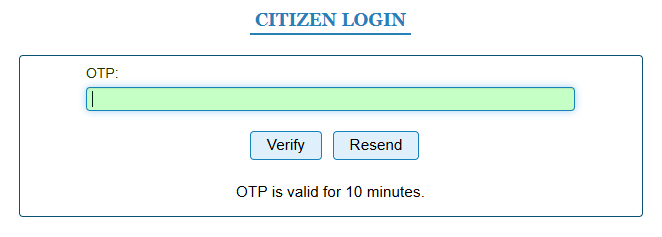
- Then, Asked OTP. You enter the 6-digit OTP sent to your mobile number Click Verify button.
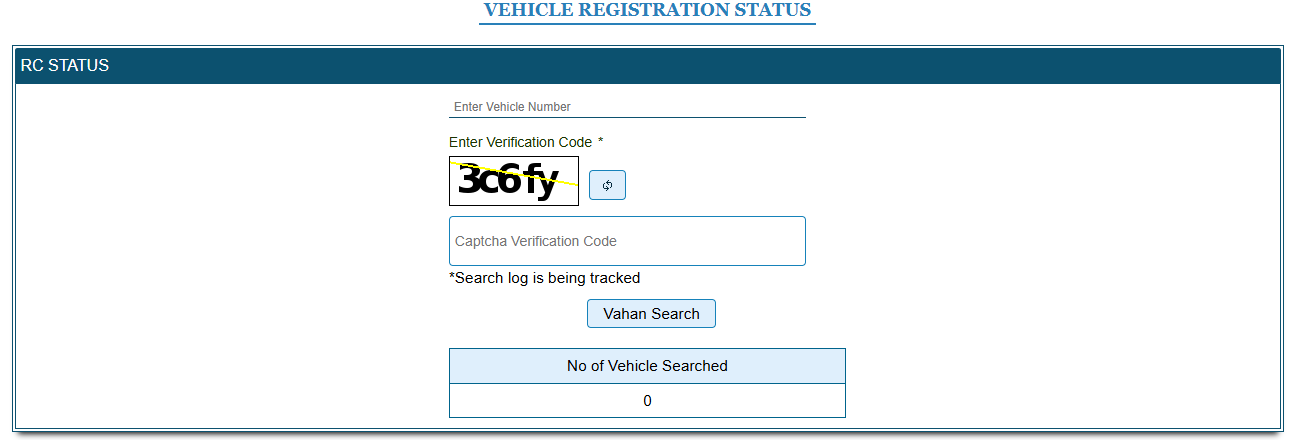
- Now the page open like the below image
- Now enter the Vehicle Registration number and Enter the captcha code
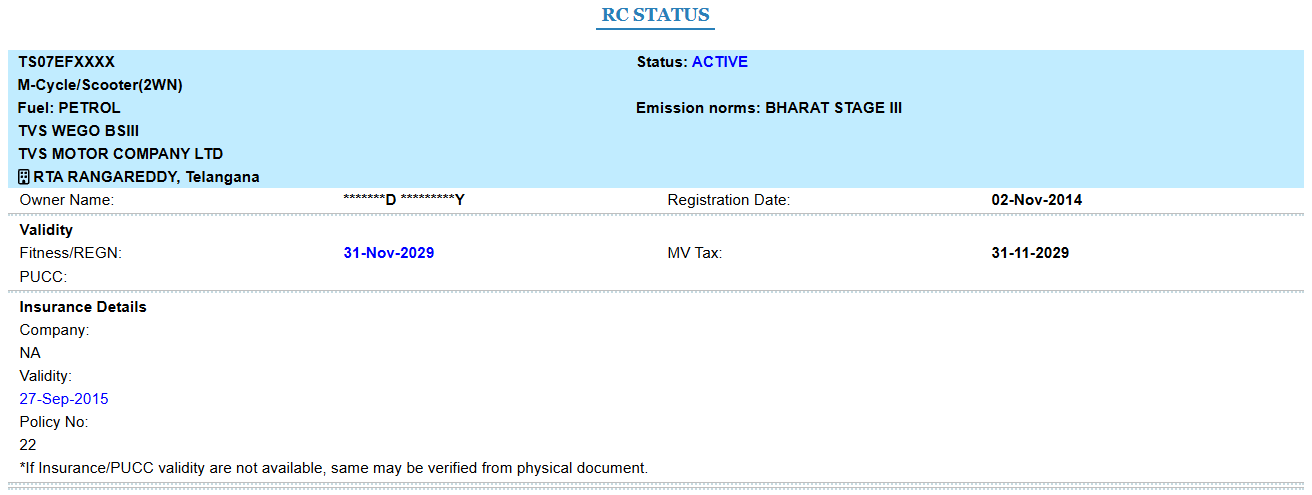
- Click Vahan Search button. The details will show on the screen

Frequently Asked Questions
1. Can I check vehicle details by number plate in India?
2. Which states are covered in the RTO database?
3. Can I get vehicle Vehicle Details by number plate?
4. Why should I use this before buying a used vehicle?
5. Is this an official government website?
Disclaimer
RTO Office Details is an informational portal designed to help users easily find RTO office information, vehicle registration details, driving licence status, and insurance-related information.
We are not an official government website. All data and links provided are for informational purposes only.
For any official verification please visit https://parivahan.gov.in/ or contact your respective State Transport Department.